
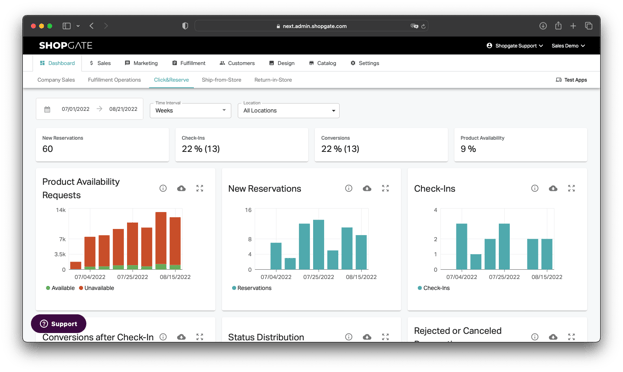
The Click & Reserve dashboard gives you deep insight into your reservations. Here you can find all the important KPIs, from local availability search to fulfillment. You can freely select a time period and time interval and filter the view by individual locations. In addition, you can export the raw data as a CSV here or query it via our API.
Infoboxes
The scorecards show at a glance the most important KPIs of your Click & Reserve process for the selected time period:
- New reservations
- Check-ins in the store
- Purchases in the store
- Product Availability for requested items
Diagrams
Product Availability Requests
See how often customers are checking the local availability of products, and how often the product is available vs is not available.
New Reservations
This chart illustrates the number of Click & Reserve type fulfillment orders (regardless of status) created online through the various channels during the selected reporting period. It illustrates the number of orders at the time they were created.
Check-Ins
Shows the number of fulfillment orders that have reached check-in status, i.e. have demonstrably visited the store.
Conversions after Check-In
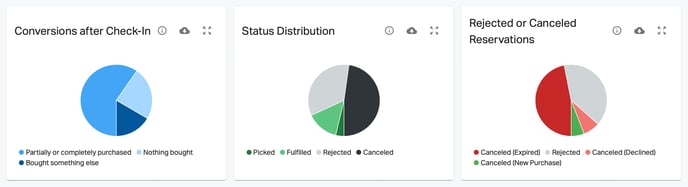
Fulfillment orders that were checked in and where the customer made a purchase (status "complete" or "reject" with a new purchase) vs. checked in but not purchased (status "reject" with a reason other than new purchase).
Status Distribution
View the status distribution of all orders placed during the selected time period.
Rejected or Canceled Reservations
View the distribution of canceled orders & rejection reasons. Based on all orders that were canceled or rejected and were placed during the selected time frame.
⌀ Number of Line Items
Average number of items per Click & Reserve order (regardless of status).
⌀ Time until Ready for Pickup
Average time from when a reservation is placed until ready for pickup. Not taking into account opening hours or holidays.