
To ensure an optimal connection between your shop system and your apps, make sure that your shop URL is always up to date. Especially after a change of server or domain, check whether your shop URL in the Shopgate Admin is current.
To do this, proceed as follows:
- Log in to your Shopgate Admin.
- In the menu, click Settings › Shop Interface.
- On the page that opens, click Actions and select Edit from the drop-down menu. A pop-up window opens.
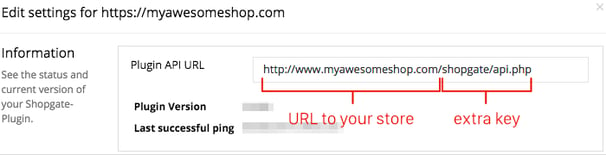
- Open your shop in your browser, copy the URL and enter it in the Plugin API URL field (see image below). It is important that you enter exactly the same URL as in the browser – "http" ≠ "https", with "www." ≠ without "www." Click Save to apply your entry.
- Once you have completed these steps, your shop plugin URL is up to date.